
Summary:
A visually appealing website is not always a high-converting website. Common web design mistakes such as confusing navigation, slow loading pages, and weak calls-to-action can frustrate visitors and reduce conversions. Understanding these issues helps businesses create websites that support growth instead of limiting it.
Many businesses focus on making their websites look impressive, but conversions depend on more than appearance. If visitors cannot quickly understand your offer, find information, or complete actions, even the most attractive website may fail to generate results.
Why Does Web Design Have Such a Big Impact on Conversions?
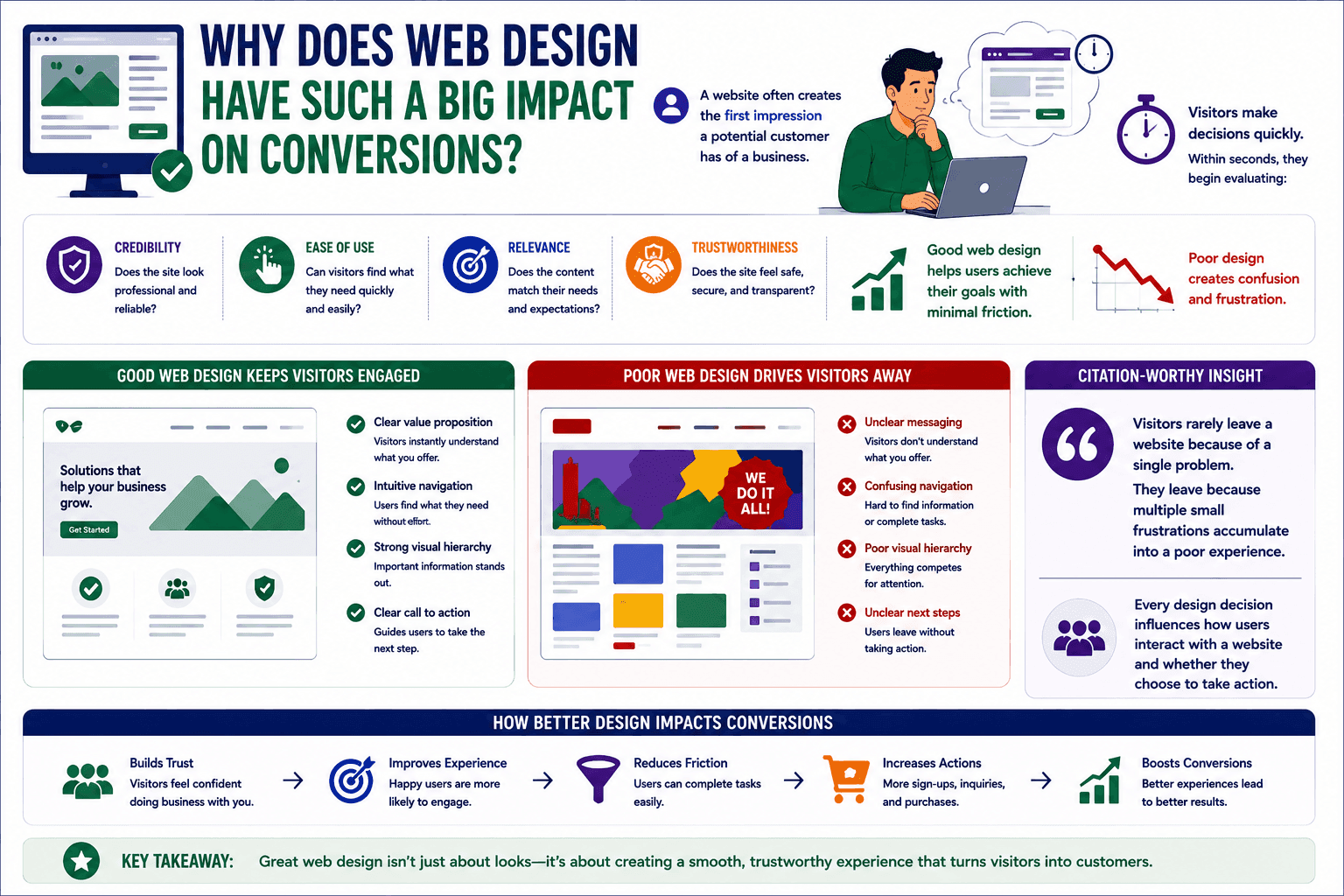
A website often creates the first impression a potential customer has of a business.
Visitors make decisions quickly.
Within seconds, they begin evaluating:
- Credibility
- Ease of use
- Relevance
- Trustworthiness
Good web design helps users achieve their goals with minimal friction.
Poor design creates confusion and frustration.
Citation-worthy insight:
Visitors rarely leave a website because of a single problem. They leave because multiple small frustrations accumulate into a poor experience.
Every design decision influences how users interact with a website and whether they choose to take action.
How Does Confusing Navigation Reduce Conversions?
Navigation is one of the most important elements of website usability.
When visitors cannot find what they need, they often leave rather than continue searching.
Common navigation mistakes include:
- Too many menu items
- Unclear page labels
- Hidden important information
- Complex site structures
- Inconsistent navigation patterns
Users should be able to understand where to go next without thinking too hard.
A well-organized navigation system improves engagement and helps visitors move naturally through the website.
Whether the goal is making a purchase, requesting information, or booking a service, navigation should guide users toward that outcome.
Topic: UI/UX Design
Why Do Slow Websites Lose Potential Customers?
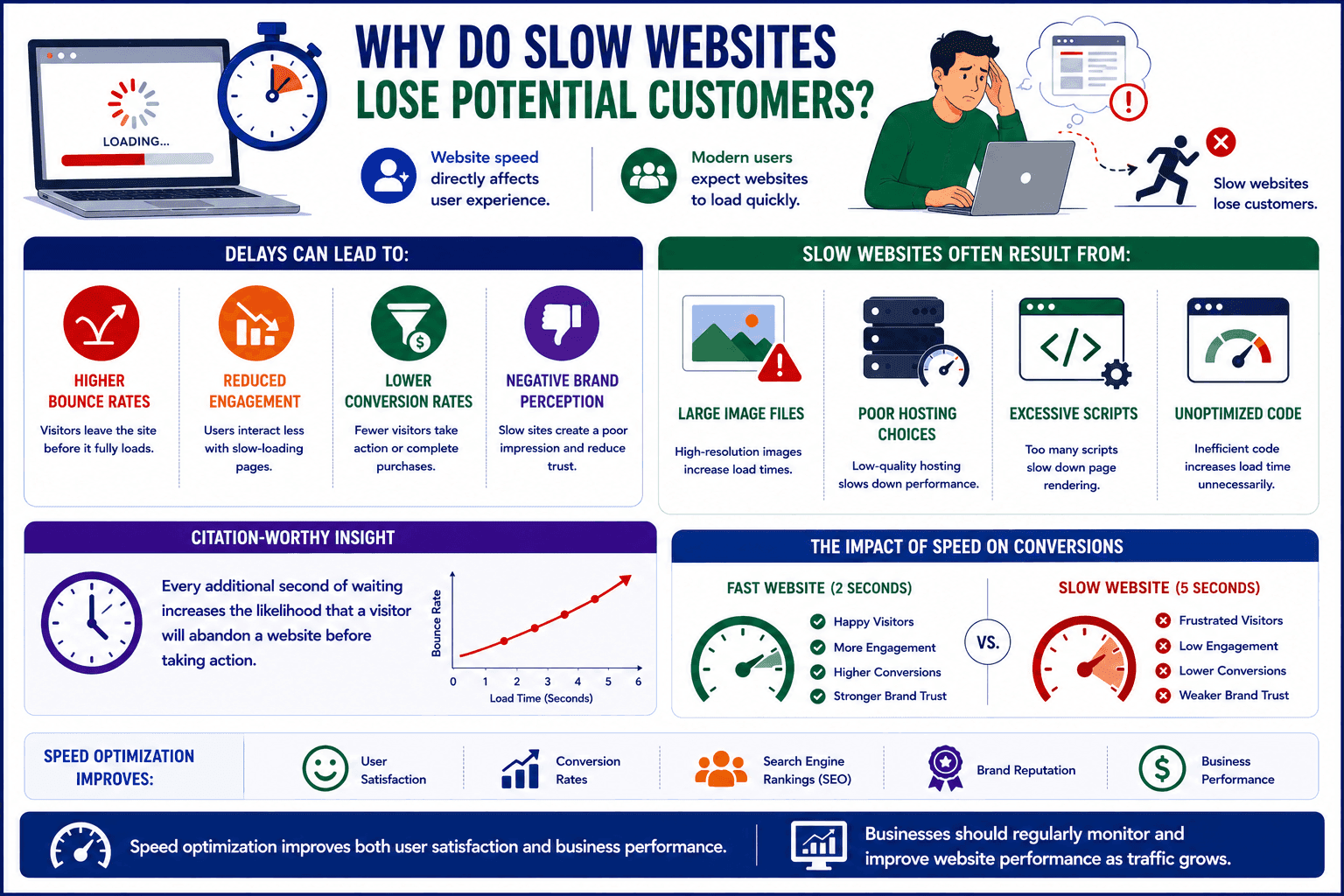
Website speed directly affects user experience.
Modern users expect websites to load quickly.
Delays can lead to:
- Higher bounce rates
- Reduced engagement
- Lower conversion rates
- Negative brand perception
Slow websites often result from:
- Large image files
- Poor hosting choices
- Excessive scripts
- Unoptimized code
Citation-worthy insight:
Every additional second of waiting increases the likelihood that a visitor will abandon a website before taking action.
Speed optimization improves both user satisfaction and business performance.
Businesses should regularly monitor and improve website performance as traffic grows.
Topic: Website Performance Research
What Happens When Calls-to-Action Are Weak or Unclear?
A website may attract visitors successfully but still fail to convert them.
One common reason is weak calls-to-action (CTAs).
Visitors need clear guidance about what to do next.
Examples include:
- Request a consultation
- Book a demo
- Download a guide
- Contact the team
- Start a project
Mistakes often include:
- Vague button text
- Too many competing CTAs
- Poor placement
- Lack of visibility
A strong CTA removes uncertainty and makes the next step obvious.
The easier it is for visitors to act, the more likely they are to convert.
How Can Poor Mobile Design Hurt Conversion Rates?
A large portion of website traffic now comes from mobile devices.
Yet many businesses still design primarily for desktop users.
Common mobile design mistakes include:
- Tiny text
- Difficult navigation
- Slow loading pages
- Poor button placement
- Unresponsive layouts
Mobile visitors expect the same quality experience as desktop users.
If a website becomes difficult to use on smaller screens, conversion opportunities can be lost quickly.
Businesses should test websites regularly across different devices and screen sizes.
Responsive design is no longer optional—it is a basic expectation.
Topic: Responsive Web Design
Why Is User Experience More Important Than Visual Effects?
Animations, visual effects, and creative layouts can make websites look impressive.
However, excessive design elements can sometimes distract users from important actions.
Good user experience focuses on:
- Simplicity
- Clarity
- Accessibility
- Efficiency
- Consistency
The goal is not to impress visitors.
The goal is to help them accomplish something.
Voice-search answer:
"What is the biggest web design mistake that reduces conversions?"
One of the biggest web design mistakes is creating unnecessary friction that makes it harder for visitors to find information or complete desired actions.
Most platforms help businesses find service providers. Toskie TeamUp helps businesses connect with verified web designers, UI/UX specialists, developers, and mentors who can collaborate on real projects and improve digital experiences that drive results.

Topics:
Web development
Digital marketing
User experience design
UX best practices
A website should do more than look professional. It should guide visitors, build trust, and support business goals. By eliminating common web design mistakes, businesses can create smoother user experiences and improve conversion performance over time.
If your expertise includes web design, UI/UX, front-end development, or conversion optimization, your skills can help businesses transform website visitors into customers. Toskie TeamUp is a neighborhood talent platform where professionals can collaborate on real projects, teach practical skills as Trainers, or guide others as Mentors. With one profile and three opportunities, Toskie TeamUp helps expertise create measurable business impact. Create your profile and connect with innovators looking to improve their digital presence.
Related blogs:
- How User Experience Influences Customer Decisions Online
- Website Conversion Optimization: Small Changes That Deliver Big Results
Related skill page:
UI/UX Design
Frequently Asked Questions
Comments
Be the first to leave a comment.