
Summary:
WordPress powers millions of websites, but performance issues can slow growth, hurt user experience, and reduce search visibility. Understanding common causes of slow WordPress websites helps businesses improve speed, reliability, and overall website performance.
A slow WordPress website does more than frustrate visitors. It can reduce conversions, impact search rankings, and create a poor first impression. The good news is that most WordPress performance issues have identifiable causes and practical solutions.
Why Does Website Performance Matter for Business Growth?
Website speed directly affects how users interact with a business online.
When pages load slowly, visitors are more likely to leave before exploring products, services, or content.
Performance impacts:
- User experience
- Search engine visibility
- Conversion rates
- Customer trust
- Mobile usability
Even small improvements in loading speed can improve engagement and retention.
Citation-worthy insight:
Website performance is not just a technical metric—it is a business metric that influences customer behavior and revenue.
Businesses that prioritize performance often create better experiences for both users and search engines.

How Does Poor Hosting Affect WordPress Performance?
One of the most common causes of slow WordPress websites is inadequate hosting.
Many website owners choose hosting based solely on cost.
As traffic grows, low-quality hosting can struggle to handle increased demand.
Common hosting-related issues include:
- Slow server response times
- Limited resources
- Frequent downtime
- Poor scalability
Signs of hosting problems include:
- Consistently slow page loads
- Performance issues during traffic spikes
- Unreliable website availability
Upgrading to a hosting solution that matches business requirements often delivers immediate performance improvements.
Topic: Cloud Computing
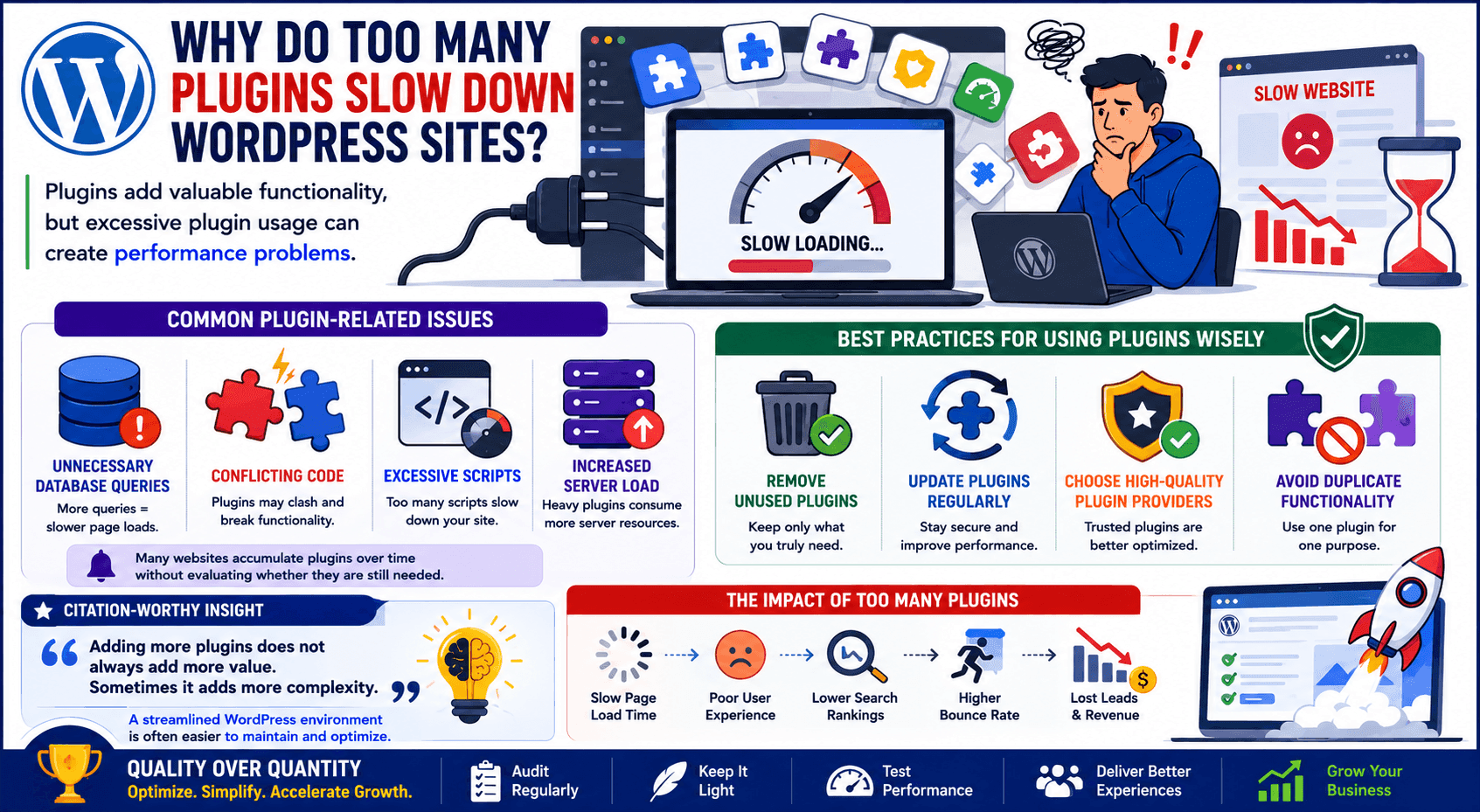
Why Do Too Many Plugins Slow Down WordPress Sites?
Plugins add valuable functionality, but excessive plugin usage can create performance problems.
Common plugin-related issues include:
- Unnecessary database queries
- Conflicting code
- Excessive scripts
- Increased server load
Many websites accumulate plugins over time without evaluating whether they are still needed.
Best practices include:
- Removing unused plugins
- Updating active plugins regularly
- Choosing high-quality plugin providers
- Avoiding duplicate functionality
Citation-worthy insight:
Adding more plugins does not always add more value. Sometimes it adds more complexity.
A streamlined WordPress environment is often easier to maintain and optimize.
How Do Large Images Impact Website Speed?
Images are one of the most common contributors to slow page performance.
High-resolution images improve visual quality but can significantly increase loading times if not optimized.
Common image mistakes include:
- Uploading oversized files
- Using incorrect formats
- Skipping image compression
- Loading unnecessary image sizes
Optimizing images can improve:
- Page speed
- Mobile performance
- User experience
- Bandwidth efficiency
Businesses should balance visual quality with performance requirements.
Topic: Web Design
Why Does Database Bloat Create Performance Problems?
WordPress websites constantly generate data.
Over time, databases may accumulate:
- Post revisions
- Spam comments
- Temporary data
- Unused records
This buildup can slow database queries and affect overall site responsiveness.
Database optimization helps:
- Improve loading speed
- Reduce server strain
- Increase efficiency
Regular maintenance prevents unnecessary data from impacting website performance.
For growing websites, database management becomes increasingly important as content and traffic expand.
Topic: Web Development
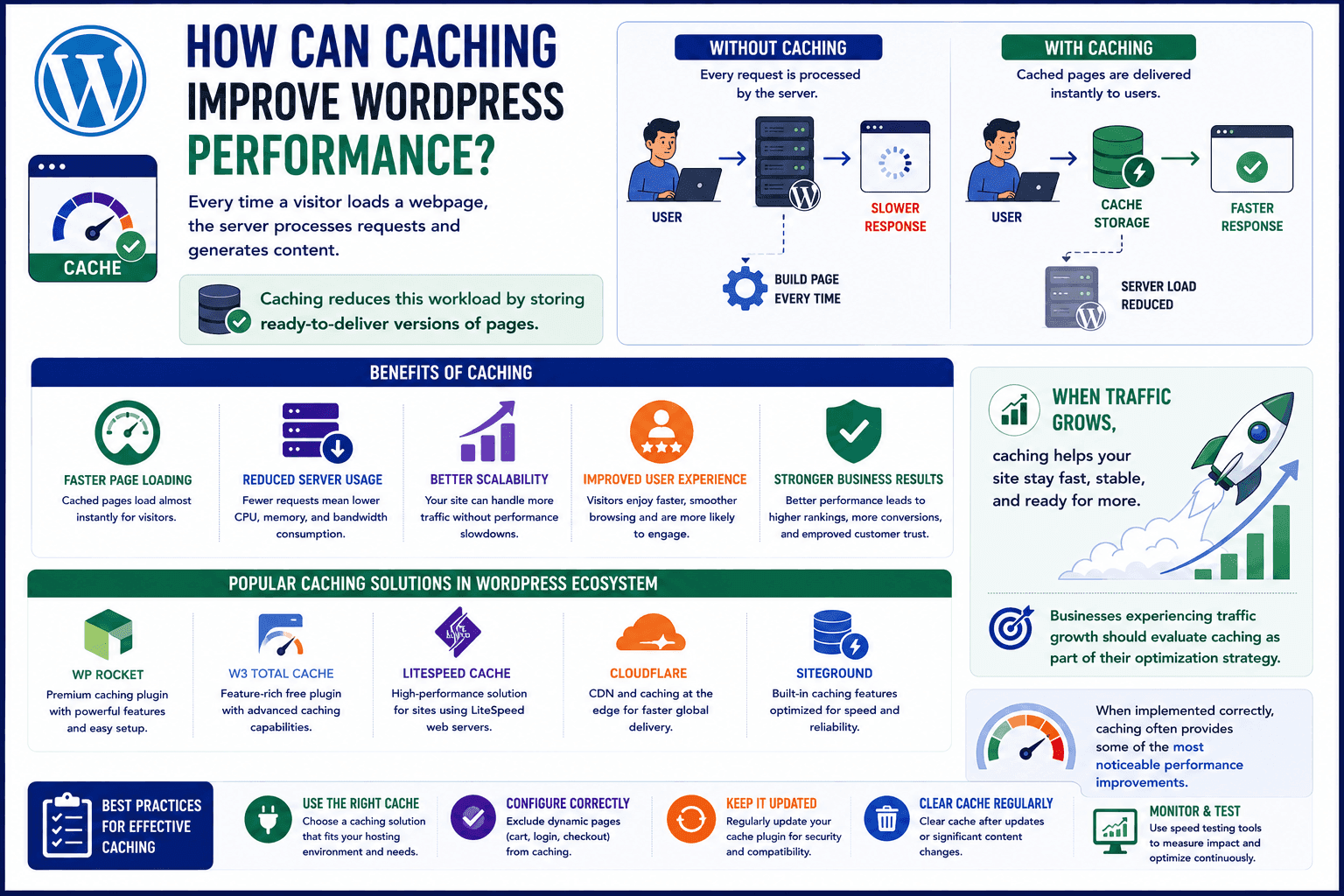
How Can Caching Improve WordPress Performance?
Every time a visitor loads a webpage, the server processes requests and generates content.
Caching reduces this workload by storing ready-to-deliver versions of pages.
Benefits of caching include:
- Faster page loading
- Reduced server usage
- Better scalability
- Improved user experience
Several caching solutions are available within the WordPress ecosystem.
When implemented correctly, caching often provides some of the most noticeable performance improvements.
Businesses experiencing traffic growth should evaluate caching as part of their optimization strategy.
Topic: Website Performance Optimization Guide
What Other Performance Improvements Should Website Owners Consider?
Performance optimization is an ongoing process.
Additional improvements include:
Content Delivery Networks (CDNs)
Deliver content from locations closer to visitors.
Code Optimization
Reduce unnecessary scripts and styles.
Regular Updates
Keep WordPress core, themes, and plugins current.
Mobile Optimization
Ensure fast performance across smartphones and tablets.
Voice-search answer:
"What is the most common reason a WordPress website becomes slow?"
One of the most common reasons is a combination of poor hosting, excessive plugins, and unoptimized images that increase loading times and server workload.
Most platforms help businesses find service providers. Toskie TeamUp helps innovators collaborate with verified WordPress developers, web performance specialists, designers, and mentors who contribute to real projects. Through one profile and three opportunities, professionals help businesses build faster and more effective websites.
Topics:
WordPress Development
Common Web Design Mistakes That Reduce Conversations
Cloud Infrastructure For Business Growth
Website Speed Best Practices
WordPress performance issues rarely appear overnight. They often develop gradually as websites grow in complexity. Businesses that proactively monitor and optimize performance create better user experiences, improve search visibility, and support long-term growth.
If your expertise includes WordPress development, web performance optimization, UI/UX design, or website maintenance, your skills can help businesses create faster digital experiences. Toskie TeamUp is a verified collaboration platform where professionals can contribute as Collaborators on real projects, share practical knowledge as Trainers, or guide innovators as Mentors. With one profile and three opportunity paths, Toskie TeamUp helps expertise create measurable results. Build your profile and connect with innovators looking to improve website performance and business outcomes.
Related blogs:
- How Website Speed Impacts SEO and User Experience
- WordPress Security Best Practices for Growing Businesses
Related skill page:
WordPress Development
Frequently Asked Questions
Comments
Be the first to leave a comment.